How syclo will be integrated into SUP, it is a common question that every existing or potential SAP mobility customer will ask.
From a high level perspective, these two platforms will be integrated into a single runtime envionment, centralized administration and non-disruptive upgrade. Syclo server will be managed by SUP Management console with unified logging, Syclo will exposed services and be consumed by SUP. Anyway, this is a high level roadmap of integration at the moment of writing.
Wednesday, November 21, 2012

Friday, November 2, 2012
Wednesday, October 31, 2012
How to open an ultralite db on iOS
As we know, since SUP 2.1.3, iOS devices rely ultralite db (sql anywhere) to do synchronization with SUP cdb. Here is a useful article of how to open this database and inspect the content. It is often needed for developers to check the status and make troubleshooting of synchronization.
Reference
Reference
Tuesday, October 30, 2012
Thursday, October 25, 2012
High Level Steps of Android Native Development on SUP
Here is the high level steps of android native development on SUP.
1. Generate Java Object API code. Be sure to use android.jar file with the correct level of SDK API
2. Create Android Project in Eclipse withe the correct level of Android SDK API and add the objectAPI library jar files into the build path.
3. Copy the generated code into the project source folder
4. Change the Android Manifest xml file and add the activity class.
5. Create User Interfaces, and java classes.
6. Run and test the application in the emulator with the correct version of OS.
The steps are based on SUP 2.1.3 version.
Tips:
1. If you use the sample code from the documentation, be sure to check the registration part, make sure to use correct server name, port, application id, username and password. Also change the mbo names to make the application run with no errors.
2. Make sure to generate, create and test the application in the same android api version.
3. Make sure the automatic registration is enabled on the target application in SCC.
4. Make sure the Java Compiler version is 1.6
Reference
Troubleshooting
Troubleshooting 2
1. Generate Java Object API code. Be sure to use android.jar file with the correct level of SDK API
2. Create Android Project in Eclipse withe the correct level of Android SDK API and add the objectAPI library jar files into the build path.
3. Copy the generated code into the project source folder
4. Change the Android Manifest xml file and add the activity class.
5. Create User Interfaces, and java classes.
6. Run and test the application in the emulator with the correct version of OS.
The steps are based on SUP 2.1.3 version.
Tips:
1. If you use the sample code from the documentation, be sure to check the registration part, make sure to use correct server name, port, application id, username and password. Also change the mbo names to make the application run with no errors.
2. Make sure to generate, create and test the application in the same android api version.
3. Make sure the automatic registration is enabled on the target application in SCC.
4. Make sure the Java Compiler version is 1.6
Reference
Troubleshooting
Troubleshooting 2
Tuesday, October 23, 2012
How Sencha is integrated with SAP
During this initial phase of the partnership, SAP worked with Sencha to create a custom JavaScript library for Sencha Touch that allows a Sencha Touch application to work with an oData producer such as the SAP NetWeaver Gateway. Sencha Touch already provides web applications with data management capabilities through its Models, Stores and Proxies; this additional capability simply allows a Sencha Touch application to more seamlessly consume oData from an SAP data source.
This library will be developer community supported and available free of charge from Sencha.
Reference
This library will be developer community supported and available free of charge from Sencha.
Reference
How PhoneGap is integrated with SAP
Through this partnership, SAP will be enhancing its existing HWC to include support for the PhoneGap JavaScript API. What this means is that existing PhoneGap applications can be migrated over to the SAP Mobile Platform HWC and run without modification. Then, when updated versions of the application become available, they can be deployed into the container remotely using the management and provisioning capabilities of the SAP Mobile Platform. To make use of the secure, reliable synchronization capabilities of the SAP Mobile Platform, the existing PhoneGap application will need to be updated to access its data through the MBO. While this is extra work that must be done by a developer, one of the primary reasons you would move an existing application onto the SAP Mobile Platform and the HWC is to take advantage of the MBO, so it’s time well spent.
Reference
Reference
How to install and configure SAP Mobile CRM
Here is the high level steps of installation and configuration of SAP Mobile CRM
1. Mobile CRM add-on installed on SAP CRM backend
2. Mobile CRM add-on installed on SAP ERP backend (optional for enabling ordering functions)
3. Deployed on SUP 2.1 and later.
4. Client software is installed on mobile devices.
Use SIMGH transaction to do custom configuration.
Reference Basic Tutorial Recording
1. Mobile CRM add-on installed on SAP CRM backend
2. Mobile CRM add-on installed on SAP ERP backend (optional for enabling ordering functions)
3. Deployed on SUP 2.1 and later.
4. Client software is installed on mobile devices.
Use SIMGH transaction to do custom configuration.
Reference Basic Tutorial Recording
Monday, October 22, 2012
What is the components of Syclo Platform
There are four major components of Syclo Agentry Platform.
1. Agentry Server. Manages the communication between backend and devices and server-side functions.
2. Agentry Editor. Eclipse-based developement IDE.
3. Agentry Test Environment. Desktop-based test client to view object, emulate supported platforms or do debugging.
4. Agentry Client. Secure client installed on devices, consists of application definitions and master data.
Reference
1. Agentry Server. Manages the communication between backend and devices and server-side functions.
2. Agentry Editor. Eclipse-based developement IDE.
3. Agentry Test Environment. Desktop-based test client to view object, emulate supported platforms or do debugging.
4. Agentry Client. Secure client installed on devices, consists of application definitions and master data.
Reference
What is Syclo's portfolio
 Syclo has four major products released in the SAP Portfolio at the moment of writing this article.
1. Work Manager for SAP ERP - Mobile Enterprise Asset Management
2. Service Manager for SAP CRM - Mobile Field Service
3. Inventory Manager for SAP ERP - Mobile Inventory Management
4. Rounds for SAP ERP - Mobile Reading
Reference
Who is Syclo
Since 1995, Syclo has worked with over 600 organizations to create, deploy and manage a variety of mobile applications. Syclo’s software extends corporate systems and databases to a wide range of mobile devices and user types, helping companies cut costs, increase productivity and make better decisions across the board. Together, Syclo’s technology and prebuilt SMART Mobile Suite applications present a flexible, reliable and cost-effective framework for enabling the mobile enterprise.
This acquisition is the next step in delivering a fully-integrated mobile platform and enterprise application portfolio to both Syclo and SAP customers,” Syclo CEO Rich Padula said.Reference
Monday, June 18, 2012
What is a complex mobile application
We often say we have to consider differently when building a complex mobile application. But what is complex?
In general complexity in a mobile application comes from:
- Asynchronous communication capabilities.
- Orchestration of many stateless service calls that are subject to a single transaction semantics. Example: Create a ServiceOrder with its Notifications.
- On device persistency and in particular keeping object state consistent with the server state.
- On device business logic such as a Pricing or a Configuration Engine.
- The ability to handle large data load. Example: equipments, material, products.
- Pushing data and updates to the mobile application.
- Support for complex data distribution rules (from server to device).
- Scalability in number of devices, requests, and data volume.
Simple Positioning of Gateway and SUP2.1.x
NetWeaver Gateway is a middleware for request/response
- Communication is request/response, stateless, un-buffered, http-based.
- Gateway exposes OData services for easy consumption.
- Routes requests 1:1 and changes protocol from http to RFC.
- Provides Push/Notification/Subscription capabilities for events and workflow.
SUP 2.1.x is a reverse proxy (not a MW) for online applications
- Connects devices from internet to intranet and routes requests to Gateway.
- Provides User Handling & Security (guards the Gateway).
- Leverages Push/Notification/Subscription (scalability of push for high volumes, planned).
- In contrast to Gateway no content development happens in this layer.
Monday, May 28, 2012
Basics of Field Service Mobile Application
1 Alerts – Send assignment notifi cations that engineers view and accept or reject
2 Debrief – Empower engineers to debrief orders at the point of service
3 Mobile access – Give engineers access to service, customer, and product information in SAP CRM
4 Support for offl ine work – Enable field engineers to work offl ine and, when online,have data refreshed automatically
5 Google Maps integration – Let field technicians view assignments on a map, so they can plan visits
6 Map Integration
7 Calendar Integration
8 Dashboard – View and monitor status and progress of a service order in real time
9 Sybase? Unwired Platform – Take advantage of a prebuilt solution to mobilize SAP applications
10 Built-in security – Improve security by centrally managing, securing, and deploying devices
2 Debrief – Empower engineers to debrief orders at the point of service
3 Mobile access – Give engineers access to service, customer, and product information in SAP CRM
4 Support for offl ine work – Enable field engineers to work offl ine and, when online,have data refreshed automatically
5 Google Maps integration – Let field technicians view assignments on a map, so they can plan visits
6 Map Integration
7 Calendar Integration
8 Dashboard – View and monitor status and progress of a service order in real time
9 Sybase? Unwired Platform – Take advantage of a prebuilt solution to mobilize SAP applications
10 Built-in security – Improve security by centrally managing, securing, and deploying devices
Blackberry Security we should know
As we all know, Blackberry has it enterprise origins which offers key security capabilities and blackberry device management. Here is a brief summary of what we can refer when selecting or designing a mobile device security infrastructure.
1. Policies
Blackberry Enterprise Server which is a single point of management solution for blackberry devices offers over 450 IT related policies such as password, device wipe, etc.
2. Secure and Reliable data transfer
Data transfer across the intranet network is end-to-end AES-256 encrypted.
3. Firewall
This function which is common on PC operating systems also proves to be useful to handle attacks.
4. Email Security
Encryption of emails and attachments. Integrated Mobile email client can provide more security features.
5. SD Card
This removable card can be a source of intruders and security risks. Do not ignore.
6. Operators and Manufacturers
RIM is the manufacturer of Blackberry devices. Also there are operators with Blackberry infrastructure around the globe. The security policies can not work without the cooperation with devices makers and telco operators.
Friday, May 25, 2012
Aspects of Mobile Security
Mobile security should but not only include the following segments or aspects.
1. Mobile secure content and threat management (MSCTM)
MSCTM defends virus, spyware, spam, hackers, intrusions, and unauthorized use. This segments can be broken into three subcategories.
1a. Mobile threat management for antimalware, antispyware, firewalls
1b. Mobile IPC for file/disk encryption, data loss prevention
1c. Mobile VPN for mobile data transfer network security
2. Mobile security and vulnerability management (MSVM)
MSVM provides device wipe, lock, patching, password, policies and compliance.
3. Mobile identity and access management (MIAM)
MIAM offers authentication and authorization technologies like certificates, PKI, SSL. It is extremely important for users to access sensitive datas or to do ecommerce transactions.
4. GPS or location based awareness
This can be a complement for industries such as retail store, healthcare and government where users are mostly granted limited access in a certain range of areas.
Lastly the key thing is to always consider mobile security solutions before you are deploying your first enterprise mobile application, not matter whether it is Mobile CRM, Mobile BI, or even Mobile Email access. If you employ a BYOD roadmap, keep in mind the users' privacy.
If you have a large deployment, do engage with telco operators. Not only can they offer data plans, also they can provide enhanced features on network perspective such as APN etc. If your deployment is small, find some hosting or leasing solution providers to ensure cost effectiveness.
Wednesday, May 23, 2012
SAP Direct Store Delivery Mobile App
Just come across an article about SAP and Capgemini's partnership on developing a Direct Store Delivery mobile application in the next five years.
http://mobility.cbronline.com/news/sap-capgemini-sign-deal-to-co-develop-new-mobile-sales-execution-application-170512
This is part of the plan of SAP to provides hundreds and thousands of mobile applications for users, most of which are planned to be developed by partners.
As we all know, SAP has release Retail Execution Mobile Application. This application provides basic and general functions of data collection and store visits for merchandiser or sales people in retail and consumer products industries. It is simple and easy to use, however, it is far from the expectations of this industries users as it cannot fully provide end-to-end solution for roles other than merchandisers in the supply chain, for example, inventory management, delivery, etc.
This future killer app of Mobile Sales Execution together with Retail Execution App will change the way which the current store delivery operations are doing. From order to invoice, from route to transportation, from warehouse to stock, from reload to unload, from visits to audits, from master data to reporting, from barcode scanning to GPS locations, the information are all in one killer app. The brand new app will connect with backend ERP and CRM via Sybase Unwired Platform which is the SAP heavily invested mobile infrastructure.
What I think is the SAP and Capgemini do need to leverage strengths of each other to build this app. Five years seems so long, but it deserves to wait.
http://mobility.cbronline.com/news/sap-capgemini-sign-deal-to-co-develop-new-mobile-sales-execution-application-170512
This is part of the plan of SAP to provides hundreds and thousands of mobile applications for users, most of which are planned to be developed by partners.
As we all know, SAP has release Retail Execution Mobile Application. This application provides basic and general functions of data collection and store visits for merchandiser or sales people in retail and consumer products industries. It is simple and easy to use, however, it is far from the expectations of this industries users as it cannot fully provide end-to-end solution for roles other than merchandisers in the supply chain, for example, inventory management, delivery, etc.
This future killer app of Mobile Sales Execution together with Retail Execution App will change the way which the current store delivery operations are doing. From order to invoice, from route to transportation, from warehouse to stock, from reload to unload, from visits to audits, from master data to reporting, from barcode scanning to GPS locations, the information are all in one killer app. The brand new app will connect with backend ERP and CRM via Sybase Unwired Platform which is the SAP heavily invested mobile infrastructure.
What I think is the SAP and Capgemini do need to leverage strengths of each other to build this app. Five years seems so long, but it deserves to wait.
Monday, May 14, 2012
Key Mobile BI Capabilities
Mobile BI has been widely agreed as a second killer app for enterprises other than mobile email. Gartner has made analysis on this area and here is a quick summary from my side.
For end users,
1. small screen support is critical.
2. collaboration and exploration can be more intruitive to users.
3. offline reporting support
4. Multiple device support
5. Dashboarding
For Developers,
1. build once, deply many
2. transform desktop reports to mobile devices with less efforts.
3. Security
4. application development, integration with external, layout customization and development APIs are essentials
From my experiences, Mobile BI can be a evil devil for enterprises. It is fresh new at the first glance, but also can be of little interest to users several days later. Collaboration functions and email integration functions largly promote users sharing what they find in the reports. Also exploration functions can enable users discover datas and business insights with less limitation. Otherwise Mobile BI is only for a small group of executive users, rather than a killer apps that can be deployed more widely throughout different departments and organizatons.
Mobile Time Management Solution
I have been involved into a very interesting mobility case in china. We used to talk more about Mobile BI, Mobile for retail, Mobile EAM, Mobile Service, but what we find in this customer is the requirement of Mobile Time Management or Mobile Timesheet Application.
This customer is one the major auto manufacturer in China, as we all know Automobile industry is booming these years in China. However consumers become to have more options as all the global players are surging in. Auto manufacturers do have the requirement of improve efficiency especially on the streamlines.
If you have been to some auto factories to see the assembly streamline, you will find a huge rooms with all the workers on different duties. Team leaders will manage their performance and fill in the timesheet at the exact time when the workers are on duty.
There are 600 to 700 team leaders in this factory, each leader is in charge of a team of 10 workers. As the streamline room is so big, team leaders have to walk around, back and forth from the working sitepoint to the fixed PC workstation terminal. This does not look easy.
So mobility shows its value by providing possiblity of filling out timesheet, working status, worker's performance (ie. parts assembled per hours) anywhere anytime with a mobile device on hand. The armed team leaders, more probably will carry a pad, search the shifting schedule of his team members which is managed by HR time management specialist in backend system (SAP HCM), check it on site, and then sychronize the data back to the system. Worker's overall performance will be generated on a monthly basis and linked to the contribution of the individuals.
The project is led by the HR team. They found mobility is a reliable way to ensuring the capture of actual and accurate performance data, while they used to be in trouble of getting it. They found the worker's overall performance assessment will be more specific and show what the worker's strengths and weakness. Hopefully, the mobility solution can contributes to the success of a HCM system and improve the overall enterprise human resource efficiency.
Why Virtual Desktop Tool is not good for mobilization
I have never thought of virtual desktop is a good way of enterprise mobilization. However some of our enterprise IT still consider it as the temporary solution for the low level of mobilization requirement by end users.
Virtual desktop is a technology with a long history. Every Unix system administrators must be quite familiar with Xmanager or some tool like that. On mobile devices it could be a different story.
1. Virtual desktop on mobile devices provide users with no good UI experiences. UI Controls are nowhere like native ones. You have to wait for remote response of each actions you make on the devices. Right click hardly works like what you get with mouse on PC.
2. Performance can be bad due to slow network connections. Client crashes with no reasons and you have to log in again and again.
3. It works on Pad only, no phone users can endure working with PC desktop on a small screen.
4. Network Expense becomes out of control. Tests found the data volumes consumption is high because of the download and rendering of the remote desktop.
It is not to say that virtual desktop on mobile devices is of no use. IT persons can do administrative works with devices on their hands. But it can only be a temporary solution for some simple requirements such as office document manipulation. Enterprises with a clear mobility strategy and vision are still considering building native, web or hybrid application for mobile device workers.
Thursday, May 10, 2012
Replication-based Synchronization Versus Message-based Synchronization
Replication-based Synchronization Versus Message-based Synchronization
When choosing between generating code for replication-based synchronization or message-based synchronization, keep the following in mind:
A mobile application can be either message-based or replication-based, but not both at the same time. A package of mobile business objects can be deployed as either message-based or replication-based.
Replication-based synchronization
Supported on BlackBerry and Windows Mobile devices.
Data flow follows an upload/download pattern.
Data is synchronous (supports background synchronization).
Uses the "poke-pull" model of push, where a notification is pushed to the device (poke), and the device fetches the content (pull).
Best for mostly disconnected mode.
Message-based synchronization
Supported on iOS and Windows Mobile devices.
Uses an asynchronous messaging protocol.
Provides reliable messaging between the device and the server.
Provides fine-grained synchronization (synchronization is provided at the data level—each process communicates only with the process it depends on).
Best for always available mode.
SUP 2.1 ESD3 Released
Today SUP 2.1 ESD3 released, let us look into some details of the new features.
1. Security enhancement. For example, LDAP integration enhancement, https communications in all levels.
2. Platform support. New version supports iOS 5.1SDK latest update with XCode development tool 4.3.1. Also it supports Blackberry OS 7.
3. HTML Web container. New APIs from PhoneGap are announced and out-of-the-box. With the co-operation with PhoneGap and other partners, Hybrid Web container can be greatly improved when developers needs to talk with native device functions such as camera, GPS, file system, bar code scan etc.
4. Performance. New version of SUP now supports RBS(Replication based Synchronization) which is supported only on Blackberry and Windows Mobile before. This provides an superior option of optimizing data replication performance for iOS developers on SUP. See here for RBS and MBS(Message based Synchronization)differences.
5. Lastly,licenses audit engine, (maybe bad news for developers). The license management has and will be integrated into Solution Manager. However, it is possible to obtain from your regional SAP sales contacts.
Overall, SUP of the new version is part of the roadmap towards a more secure, scalable, and developer-friendly platform with cloud, B2E and B2C visions.
1. Security enhancement. For example, LDAP integration enhancement, https communications in all levels.
2. Platform support. New version supports iOS 5.1SDK latest update with XCode development tool 4.3.1. Also it supports Blackberry OS 7.
3. HTML Web container. New APIs from PhoneGap are announced and out-of-the-box. With the co-operation with PhoneGap and other partners, Hybrid Web container can be greatly improved when developers needs to talk with native device functions such as camera, GPS, file system, bar code scan etc.
4. Performance. New version of SUP now supports RBS(Replication based Synchronization) which is supported only on Blackberry and Windows Mobile before. This provides an superior option of optimizing data replication performance for iOS developers on SUP. See here for RBS and MBS(Message based Synchronization)differences.
5. Lastly,licenses audit engine, (maybe bad news for developers). The license management has and will be integrated into Solution Manager. However, it is possible to obtain from your regional SAP sales contacts.
Overall, SUP of the new version is part of the roadmap towards a more secure, scalable, and developer-friendly platform with cloud, B2E and B2C visions.
Wednesday, February 1, 2012
Which device is more secure? Apple or Samsung
It is reported that, Samsung Galaxy devices have got U.S security clearance this year. The FIPS certification takes Samsung mobile devices into a higher level and ensures Samsung to enter regulated industries such as government. It is a great step, I think, to the Korean company.
Interestingly, it is widely believed that Android based devices are not as secure as Apple iOS based counterparts. However, as I searched on the web, Apple is still actively pursuing certification of FIPS and certainly is lagged behind Samsung Galaxy.
Samsung Galaxy's enhanced security features are key to its success of winning over its biggest enemy(or partner). The certification will guide enterprise users from selecting the right mobile devices to protect sensitive data. For SAP, it has been announced by this mobile advocate that, after its deployment of over 14,000 iPad, SAP will start this year to deploy several Samsung Galaxy tablets and phones per employee's choice. Apparently, Samsung Galaxy brought confidence towards its Android fans and shut the mouse of media questioning the security of it.
By contrast, Research In Motion received FIPS security certification for its BlackBerry smartphone platform in 2003 and added clearance for its PlayBook media tablet in July of last year. But RIM still suffered big crisis last year for a serious of accidents as well as poor acceptance of Playbook.
I do not doubt that Apple will pass FIPS at last as its sandboxing operating system has long been proved successful. For corporate users, Apple is still first choice whereas Samsung Galaxy is surely a powerful challenger which is likely to take off in 2012.
Wednesday, January 4, 2012
Is iCloud really beautiful?
iCloud has been introduced as a major feature of iOS5 systems. iCloud can be used to backup and restore Apple devices, upload emails, contacts, calendars and applications. This sounds awesome to Apple and consumer users, however, to enterprise IT Administrators, it can be a disaster.
Take a look at the Terms and Conditions of iCloud which is normally ignored. This means never use iCloud to backup your sensitive and important documents or content.
Also storing corporate data on iCloud can be a serious violator of corporate compliance. As in SAP, storing SAP data on iCloud would equate to storing it ‘outside of SAP’, which is strictly not allowed. Therefore, iCloud and possibly iOS5 are something which needs to undertake deep evaluation before they are corporate wide deployed.
Sybase Afaria provides a solution to disable certain build-in or user-installed application on mobile devices. For example, on corporate devices youtube and icloud can be disabled for security and compliance reasons. It is also meaningful to stop using dropbox or box.net services on coporate devices. (both are banned by Great Firewall of China, no more actions to take). Among these cloud storage services, icloud is the most integrated and transparent to unawared consumers. That is the dangerous point because consumer loses control of their privacy and is open to all kinds of phishing scams.
Take a look at the Terms and Conditions of iCloud which is normally ignored. This means never use iCloud to backup your sensitive and important documents or content.
Apple is unable to guarantee that any content you may store or access through the service will not be subject to inadvertent damage, corruption, loss or removal. Apple can also not be held responsible should damage, corruption, loss or removal of content occur.
Also storing corporate data on iCloud can be a serious violator of corporate compliance. As in SAP, storing SAP data on iCloud would equate to storing it ‘outside of SAP’, which is strictly not allowed. Therefore, iCloud and possibly iOS5 are something which needs to undertake deep evaluation before they are corporate wide deployed.
Sybase Afaria provides a solution to disable certain build-in or user-installed application on mobile devices. For example, on corporate devices youtube and icloud can be disabled for security and compliance reasons. It is also meaningful to stop using dropbox or box.net services on coporate devices. (both are banned by Great Firewall of China, no more actions to take). Among these cloud storage services, icloud is the most integrated and transparent to unawared consumers. That is the dangerous point because consumer loses control of their privacy and is open to all kinds of phishing scams.
Tuesday, December 27, 2011
Tips of building an MBO
As we know, Mobile business Objects(MBO) are object models which maps to backend systems, for example database, sap systems or web services. The mapping can be done by a bottom-up method. The easy and simple way of doing this is binding the data source at the time of development. The attributes and operations can be generated automatically. In case you do not have access to backend data source, you have to set up the things by yourself, mostly by manual.
MBO is reusable. Always keep it in mind because this is the important feature Sybase Unwired Platform offers you to speed up development cycles. MBOs can be reused in the same project and consumed by different mobile devices. They can also be consumed across projects in Workspace. Suppose you have a complicated mobile application to build, you can try to group all the MBOs in one project and make them referenced. Logical group can be used to tidy things up a little more.
MBO can contain parameters. For the querys you build inside the MBO, parameters can be taken in as a sychronaztion parameter, probably in the WHERE clause.
Switch to Advanced Developer Profile when designing your MBO. It includes the complete features and setting of MBO. To switch between developer profiles, right-click in the Mobile Application Diagram,
select Switch Developer Profile, then select either Basic or Advanced.To view or modify your preference settings for the developer profile, click Window >
Preferences > Sybase, Inc. > Mobile Development > Developer Profile.
Last but not least, always consider performance at the first priority. Sybase Unwired Platform and its build-in Cache Database(CDB) offers good choices of improving performance of enterprise mobile applications. Think about querying a big database table by mobile devices. Use load parameter and sychronization parameter with data refresh mechanism to reduce the data replication volumes. Data Partition is also a good method to increase parrallel processing of data replications.
MBO is reusable. Always keep it in mind because this is the important feature Sybase Unwired Platform offers you to speed up development cycles. MBOs can be reused in the same project and consumed by different mobile devices. They can also be consumed across projects in Workspace. Suppose you have a complicated mobile application to build, you can try to group all the MBOs in one project and make them referenced. Logical group can be used to tidy things up a little more.
MBO can contain parameters. For the querys you build inside the MBO, parameters can be taken in as a sychronaztion parameter, probably in the WHERE clause.
Switch to Advanced Developer Profile when designing your MBO. It includes the complete features and setting of MBO. To switch between developer profiles, right-click in the Mobile Application Diagram,
select Switch Developer Profile, then select either Basic or Advanced.To view or modify your preference settings for the developer profile, click Window >
Preferences > Sybase, Inc. > Mobile Development > Developer Profile.
Last but not least, always consider performance at the first priority. Sybase Unwired Platform and its build-in Cache Database(CDB) offers good choices of improving performance of enterprise mobile applications. Think about querying a big database table by mobile devices. Use load parameter and sychronization parameter with data refresh mechanism to reduce the data replication volumes. Data Partition is also a good method to increase parrallel processing of data replications.
Build Mobile Workflow 101 Application by SUP - Day(0)
Mobile Workflow or Mobile container has always been a important technology element in Sybase Unwired Platform. It enables developers to use HTML5 and Jquery to build applications which can be deployed across different mobile devices. Here is an example of how to build a simple mobile workflow application by Sybase Unwired Platform.
I assume that you have already installed Sybase Unwired Platform Runtime Server 2.1 and Mobile SDK 2.1. At the time of writing this article, SUP2.1 ESD#1 has just released. However we still use version 2.1 as it should be more stable at this moment.
1. We start by building a new sybase mobile application named Customer101
2. First Step, we need to build a Mobile Business Object(MBO) from a database table. This is a simple business object which maps attributes upon the customer table in sampledb which is shipped and installed with SUP. Drag the customer table into the mobile application diagram. Uncheck the operations in the popup window.
3. Deploy the MBO into the SUP Server. As we will test the built application on iOS simulator, we choose Message-based Replication type.
4. Create a Mobile Forms named Customer_List. The generated xbw file is located in the major location we design and build our application UI and flows. We check the "Can be start from the client" option.
5. Drag the Customer MBO we create in previous steps from the Workspace Navigator into the Forms Editor, it will automatically generate two screens for you, one is customer and the other is the customerdetails. Screen flow has already been created between these two screens.
6. Create a MenuItem named Open, set the type as "online request", object query as "findall" and success screen as "customer".
7. Generate mobile workflow package, use the default settings and assign workflow to users we registered in Sybase Control Center. This concludes the whole process of development.
8. Take a test in the iOS simulator. And you will get a "beautiful" customer list when you click "open" in the start screen.
In next part, we will try to customize the application and see how we can make it more like a productive mobile application.
I assume that you have already installed Sybase Unwired Platform Runtime Server 2.1 and Mobile SDK 2.1. At the time of writing this article, SUP2.1 ESD#1 has just released. However we still use version 2.1 as it should be more stable at this moment.
1. We start by building a new sybase mobile application named Customer101
2. First Step, we need to build a Mobile Business Object(MBO) from a database table. This is a simple business object which maps attributes upon the customer table in sampledb which is shipped and installed with SUP. Drag the customer table into the mobile application diagram. Uncheck the operations in the popup window.
3. Deploy the MBO into the SUP Server. As we will test the built application on iOS simulator, we choose Message-based Replication type.
4. Create a Mobile Forms named Customer_List. The generated xbw file is located in the major location we design and build our application UI and flows. We check the "Can be start from the client" option.
5. Drag the Customer MBO we create in previous steps from the Workspace Navigator into the Forms Editor, it will automatically generate two screens for you, one is customer and the other is the customerdetails. Screen flow has already been created between these two screens.
6. Create a MenuItem named Open, set the type as "online request", object query as "findall" and success screen as "customer".
7. Generate mobile workflow package, use the default settings and assign workflow to users we registered in Sybase Control Center. This concludes the whole process of development.
8. Take a test in the iOS simulator. And you will get a "beautiful" customer list when you click "open" in the start screen.
In next part, we will try to customize the application and see how we can make it more like a productive mobile application.
Wednesday, December 21, 2011
SAP still favors Blackberry?
Last week I met with an guy from OpenText, which is now the largest Canadian technology company, just surpassing RIM this year in market share. He was using blackberry and he told me blackberry is still their first choice recommended by his company but lots of his colleagues have switched to iPhone or Android this year. He said it can hardly be imagined several year ago when all the employees of OpenText are enjoying Blackberry shipped from their Canadian neighbor.
It is true that RIM is in its downside. This week RIM(Research In Motion) reports its third quarter fiscal 2012 results. Compared to Q2, the number is up 24% but is down 6% from same quarter last year. RIM's share drops to its lowest level in recent seven years.
Some blames arise pointing out the failure of playbook which distract RIM's focus on Blackberry phones. From my point of view, playbook is still in the team of potentially threating iPad.
It is easy to see that Playbook has much in common with iPad, same screen resolution, sandboxing operating system and app store. Because of these thing, Playbook is more secure and reliable to deploy into enterprise environment, not to say RIM has its own huge enterprise users. Some of my customers always complain about the different versions of Android devices and hardly any code can cater different screen resolutions. Open source makes community thriving but will be a disaster to enterprises. Same problems may happen to meego, and webos which is announced to be open-source by HP.
I think and I guess that is why SAP is still favoring Blackberry or Playbook. SAP has the most mobility demos running on iOS and Blackberry. Recently several additional Playbook demos are released internally focusing on different industry scenarios. I happen to have time installing the Playbook simulator and run out some screenshots for your digest. Playbook may not be ready now but is deserved to get visionary attentions.

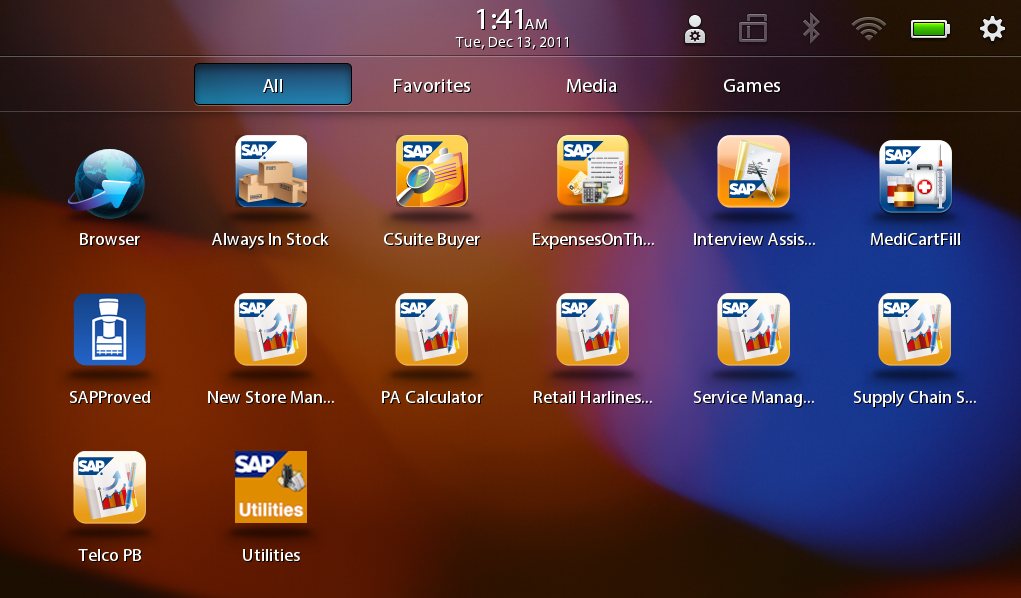


It is true that RIM is in its downside. This week RIM(Research In Motion) reports its third quarter fiscal 2012 results. Compared to Q2, the number is up 24% but is down 6% from same quarter last year. RIM's share drops to its lowest level in recent seven years.
Some blames arise pointing out the failure of playbook which distract RIM's focus on Blackberry phones. From my point of view, playbook is still in the team of potentially threating iPad.
It is easy to see that Playbook has much in common with iPad, same screen resolution, sandboxing operating system and app store. Because of these thing, Playbook is more secure and reliable to deploy into enterprise environment, not to say RIM has its own huge enterprise users. Some of my customers always complain about the different versions of Android devices and hardly any code can cater different screen resolutions. Open source makes community thriving but will be a disaster to enterprises. Same problems may happen to meego, and webos which is announced to be open-source by HP.
I think and I guess that is why SAP is still favoring Blackberry or Playbook. SAP has the most mobility demos running on iOS and Blackberry. Recently several additional Playbook demos are released internally focusing on different industry scenarios. I happen to have time installing the Playbook simulator and run out some screenshots for your digest. Playbook may not be ready now but is deserved to get visionary attentions.
Monday, December 19, 2011
Secure data on device by Sybase Unwired Platform
After you download and open the latest SAP mobile apps downloaded from itunes store, you will be prompted to set a vault password for the first time you get your device on boarding. This is the solution of Sybase Unwired Platform to secure your data on your mobile device.
DataVault uses APIs to encrypt and unlock local data store by passing the password. The mobile user must set up the password during application initialization and must remember it forever. They will be asked to re-enter the password each time they restart the application. The connection information of backend Sybase Unwired Platform as well as the certificate and user credentials for authentication are also stored and can only be opened by inputing the vault password.
DataVault is a powerful because it can set retry limit of password input, expiration time before last login and mandatory password change period. DataVault is located in somewhere specific to device. On iPhone it is stored as and encrypted blog in the keychain. The local store cannot be accessed by other applications as sandboxing rules of device prevent that. Retry limit control of password secures lost mobile devices and it is not possible to decrypt the underlying data store unless the vault password is retrieved.
DataVault uses APIs to encrypt and unlock local data store by passing the password. The mobile user must set up the password during application initialization and must remember it forever. They will be asked to re-enter the password each time they restart the application. The connection information of backend Sybase Unwired Platform as well as the certificate and user credentials for authentication are also stored and can only be opened by inputing the vault password.
DataVault is a powerful because it can set retry limit of password input, expiration time before last login and mandatory password change period. DataVault is located in somewhere specific to device. On iPhone it is stored as and encrypted blog in the keychain. The local store cannot be accessed by other applications as sandboxing rules of device prevent that. Retry limit control of password secures lost mobile devices and it is not possible to decrypt the underlying data store unless the vault password is retrieved.
Thursday, December 15, 2011
SAP CRM Dashboard Cockpit on iPad
What are you using to track sales deals instantly or acquiring sales revenue summary report in quarter end? Or you just get frustrated to get visibility of your sales person performance compared to last year?
These are the common problems that our business C-Level persons are facing with. I can tell you what SAP does.
In SAP, all managers are using business object explorer cockpit on iPad to get the sales datas and review team and individual performances, no matter whether they are in office or in travel. Business Object Explorer allows users to drill down into information they want by adding search filters without switching between pages. Data Loading is in high performance because the backend system has already employs SAP's innovation HANA memory-computing solution.
Take a look at the sample screenshots.

These are the common problems that our business C-Level persons are facing with. I can tell you what SAP does.
In SAP, all managers are using business object explorer cockpit on iPad to get the sales datas and review team and individual performances, no matter whether they are in office or in travel. Business Object Explorer allows users to drill down into information they want by adding search filters without switching between pages. Data Loading is in high performance because the backend system has already employs SAP's innovation HANA memory-computing solution.
Take a look at the sample screenshots.
Wednesday, December 14, 2011
SAP Netweaver Gateway Short Introduction
SAP NetWeaver Gateway enables UI-centric consumption of SAP Business
Suite data by popular devices or platforms in an easy and standards-based
fashion. SAP NetWeaver Gateway is a development framework which is
available as a SAP NetWeaver Application Server ABAP (AS ABAP) add-on, which you
can install on top of your existing SAP Business Suite or application
platform.
SAP NetWeaver Gateway offers development and generation tools to create consumption model structures exposed as REST based services or consumption model structures exposed via OData to a variety of client development tools. This is the vehicle to connect SAP Business Suite data and functionality to the target clients, platforms and programming framework.
SAP Netweaver Gateway is introduced as an optional component to work with Sybase Unwired Platform 2.1 for integrating backend SAP systems.
SAP NetWeaver Gateway offers development and generation tools to create consumption model structures exposed as REST based services or consumption model structures exposed via OData to a variety of client development tools. This is the vehicle to connect SAP Business Suite data and functionality to the target clients, platforms and programming framework.
SAP Netweaver Gateway is introduced as an optional component to work with Sybase Unwired Platform 2.1 for integrating backend SAP systems.
Tuesday, December 13, 2011
Vmware Mobile Virtualization Platform (MVP) Arrives
It is very interesting that vmware finally steps into the mobile world. The idea of Vmware on mobile devices came out year ago. Now this virtualization company brings up the idea into product which enables users to run more than one mobile operating systems on one physical mobile device. Designed for the Bring Your Own Device wave, the Vmware Mobile Virtualization platform comes out in the right time to free users from bringing two mobile phones, one for corporate use and the other for personal use.
I am quite confident of the technology vmware employs in this innovative product. However it is more likely to appeal to IT persons than end users. Running several OS on one device, Vmware Mobile Virtualization Platform definitely harms the disply performance and user experiences. Busy end users will get frustrated on switching between operating systems, enduring the poor performance and frequent low battery. Not to say that this solution only support Android and possible will not work on Apple I guess.
The same problem occurs to Citrix Receiver, which virtualises remote desktops into mobile device interface. Business users often complains about long latency, difficulties to gesture, and frequest connection failures.
What the end users want, from my experience, is a real BYOD solution which seamless seperates personal and corporate datas in the backward layer, not a solution of two or more mobile operating systems. Vmware workstation solution can maximize hardware resources, whereas vmware mobile hardly tells the same success story because it runs exactly in end users hands. It certainly gives IT administrators easy ways of provisioning and revoking devices just like installing and uninstalling vmware images on desktops, however, for business users, the solution is apparently not smart enough.
I am quite confident of the technology vmware employs in this innovative product. However it is more likely to appeal to IT persons than end users. Running several OS on one device, Vmware Mobile Virtualization Platform definitely harms the disply performance and user experiences. Busy end users will get frustrated on switching between operating systems, enduring the poor performance and frequent low battery. Not to say that this solution only support Android and possible will not work on Apple I guess.
The same problem occurs to Citrix Receiver, which virtualises remote desktops into mobile device interface. Business users often complains about long latency, difficulties to gesture, and frequest connection failures.
What the end users want, from my experience, is a real BYOD solution which seamless seperates personal and corporate datas in the backward layer, not a solution of two or more mobile operating systems. Vmware workstation solution can maximize hardware resources, whereas vmware mobile hardly tells the same success story because it runs exactly in end users hands. It certainly gives IT administrators easy ways of provisioning and revoking devices just like installing and uninstalling vmware images on desktops, however, for business users, the solution is apparently not smart enough.
Friday, December 9, 2011
RIM's Rhyme in mobile
- Blackberry devices are considered not secure enough
- Not supporting different types of devices
- The customer needs a more open and mature platform for rapid enterprise application development and deployment instead of a single proprietory vendor solution
- Lack of applications and intuitive UI
- High risks of government regulation and banning (frequetly happen in China). Not to say it already happens in India and Britain this year.
That is the reason, when I see the news that RIM released Blackberry Fusion, at the first moment I googled into the product site. After scanning around several minutes, I catch up some key points which you can follow,
- Blackberry Fusion is coming in 2012, so it is not yet to release
- Blackberry Fusion is based on the acquired technology which runs on top of BES Server to support iOS and android, so the integration is uncertain
- Blackberry Balance(what a good name) technology enables seperation of personal and working data on blackberry devices. It fits quite well with BYOD(Bring your own device) trend.
RIM is struggling to keep its customers from losing confidence. RIM BES solution still works best in a pure blackberry-enabled enterprise, as it is also agreed by the customer I mentioned above. However, in this world which iPhone and Android dominate and will dominate in the near future, we need to see more on the endeavor of the Canadians.
Battle begins in mobile device management

This interesting story starts from RIM, traditional mobile giant, which announced that the newest Blackberry Fusion can now support and manage Android and iOS devices. Built on the well-known blackberry enterprise server and technologies of the acquired Ubitexx, Fusion seems to be enforcing RIM's MDM capabilities.
Google follows the wave and also drops another bomb just after RIM. This solution sits in the cloud at this moment and is free to its existing apps customers. I am not sure whether this products relates to google's acquisition of motorola mobile, but it is definitely true that google sees the market and moves up.
IBM, the big blue company dives into this emerging area by working with Juniper Networks. Big install base plus good technology will help IBM out from too far away behind this mobility campaign.
Twitter snapped up a two-persion firm mainly for the technology and talent of securing and protecting Android mobile device datas.
Let's go back and see SAP/Sybase's strategy on mobile device management. Afaria, one of the key product in SAP's mobility big picture, supports major devices such as iOS, Android, Blackberry, Symbian, Windows Mobile and Window Phone(early 2012). SAP now has the good technology, exellent product, reference customers, and while the competitors kick off the battle, SAP has some commitment to make in the ever changing market.
Subscribe to:
Posts (Atom)